Shree Dev Font Download: Guide (2026)
Hi desiners are you looking to download the Shree Dev font for your design or typing needs? You’ve come to the right place! In this guide, we’ll walk you through everything from what the Shree Dev font is. How to download and install it, and best practices when using it in your projects.
Using this font, you can add an authentic touch to your Devanagari text. So let’s go further. Below is a preview of the font.
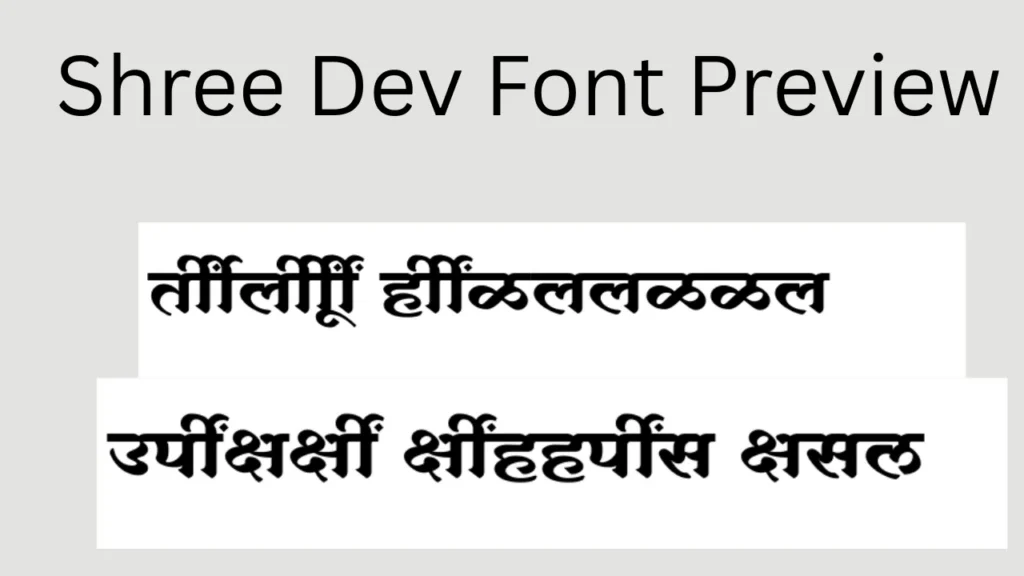
What Is Shree Dev Font?
Shree Dev is a Devanagari script typeface widely used in India for languages like Marathi, Hindi, and Nepali. It’s available as a TrueType Font (.ttf) that you can install on Windows, macOS, and Linux systems.
This font has several variations (e.g., SHREE-DEV7-0715, SHREE-DEV7-0708, SHREE-DEV7-2317), each with a slightly different look and character set.
A Short History of Shree Dev Font
While not as universally known as Mangal or Kruti Dev, Shree Dev has been adopted by many designers and typographers for its clean and traditional Devanagari style. It’s widely available across font libraries and free font websites. You can use it in your next design projects.
The Devanagari script itself has a long history dating back centuries, and fonts like Shree Dev help bring that script into modern digital usage.
Why should we use?
Shree Dev is versatile! Here are some common use cases:
- Graphic design and branding – For traditional or cultural projects.
- Web and print media – Ideal for headings and readable text display.
- Invitations, posters, flyers – Adds an elegant Devanagari touch.
- Personal & professional documents – Perfect for newsletters or office use.
When using Shree Dev in Adobe Photoshop, ensure you turn on ‘Middle Eastern & South Asian.
Popular Versions
There are several variants you might see:
- SHREE-DEV7-0715 Regular – Popular version with high download count.
- SHREE-DEV7-0708 Regular – Another widely used variation.
- SHREE-DEV7-0709 Regular – Slight stylistic differences.
- SHREE-DEV7-2317 Regular – A varied style suited for modern use. (fontsindia.com)
- Other Smaller Variants – Including SHREE-DEV7-0707, SHREE-DEV7-0705, etc.
Where to Download
You can download Shree Dev font for free from reputable font libraries. Here are a few sources:
- FontsIndia.com – various Shree Dev versions. (fontsindia.com)
- FreeFonts.co – different regular versions of Shree Dev. (freefonts.co)
- TrueFonts.net – font downloads with previews. (True Fonts)
When selecting a source, always make sure you’re getting the font from a trusted website to avoid malware or unwanted software bundled with downloads.
How to Install
On Windows
- Download the
.ttffont file. - Right-click it and select Install.
- It will now be available in your font list.
On macOS
- Download the font file.
- Double-click it to open Font Book.
- Click Install Font.
On Linux
- Create a
.fontsfolder in your home directory (if it doesn’t exist). - Place the
.ttffile inside. - Run
fc-cache -f -vin the terminal.
After installation, restart your applications to see the new font.
Best Practices
License & Usage
Even though many Shree Dev downloads are free, always check the license before using the font in commercial projects.
Unicode Compatibility
Some older Devanagari fonts may not support Unicode standards, which can cause display issues in modern applications. When possible, choose Unicode-compatible fonts for broader use.
Alternatives
If Shree Dev doesn’t fit your needs, you can explore:
- Mangal – Unicode standard Devanagari font.
- Kruti Dev – Popular non-Unicode Hindi font. (Wikipedia)
- Devlys – Another classic Hindi font.
Each has its own style; choosing depends on your project’s goals.
Quick Comparison: Shree Dev vs. Kruti Dev vs. Mangal
| Feature | Shree Dev | Kruti Dev | Mangal |
| Encoding | Legacy (Non-Unicode) | Legacy (Non-Unicode) | Unicode (Global Std) |
| Primary Use | Graphic Design / Print | Govt Exams / Typing Tests | Web Content / Blogs |
| Keyboard Layout | Remington / Custom | Remington (Typewriter) | Inscript / Remington GAIL |
| Device Support | Desktop (TTF) | Desktop (TTF) | Universal (Mobile & PC) |
| Data Transfer | Shows as gibberish if not installed | Shows as gibberish if not installed | Safe (Readable everywhere) |
Troubleshooting Common Issues
Font Not Appearing
Make sure you’ve installed it properly and restarted your app.
Blocky Text or Missing Characters
This issue happens when a font isn’t Unicode-compatible. Choose another version or ensure your document supports Devanagari encoding.
Shree Dev is a culturally rich Devanagari script that is used in a variety of applications. Whether you are making a poster, a logo, or a festive invitation, this font is good to add a touch of tradition.
Now that you know the procedure to download and install it, go ahead and give your design that authentic look of Devanagari script! If you have any query please contact us using the contact page.
Some Questions Related to the Font
Is Shree Dev font free to download?
Many versions are free for personal use, but some specific professional variants may require a commercial license. Always verify the .txt or a license file provided by the font creator.
Can I use Shree Dev for commercial projects?
Yes, you can use it as per the font licence policy.
Does Shree Dev support Unicode?
Some versions may not be fully Unicode-compatible, which affects text display in certain apps.
How is Shree Dev different from Kruti Dev?
Kruti Dev is a well-known Hindi font with different keyboard layouts, while Shree Dev is a traditional Devanagari font used across languages. (Wikipedia)
Can I install Shree Dev on mobile devices?
Yes, but font support varies by OS.
Disclaimer: The fonts mentioned in this guide are the property of their respective owners/designers. While many versions are available for free, licensing terms can change. We recommend checking the specific license file included with your download for commercial use permissions. DocumentDownloader.online does not host these files and is not responsible for third-party content.